

GA4's utm_source_platform, utm_id and Custom UTMs
Last updated · published
GA4 accepts four UTM parameters beyond source, medium, campaign, term and content. utm_id carries a campaign ID and populates the Manual campaign ID dimensions. utm_source_platform names the platform that directed the traffic and populates Manual source platform. utm_creative_format and utm_marketing_tactic are defined by Google, but Google says neither is currently reported. Custom UTM parameters you invent yourself never become campaign dimensions at all.
Two of the four are reported and worth standardizing when you import cost data or buy through several platforms. The other two are a cheap bet, as long as you fill them from a fixed vocabulary.
TL;DR
utm_idis an optional join key for GA4 cost data import, on top of the required source, medium and date. Google calls it highly recommended, and imported values must match what GA4 logged exactly.utm_source_platformrecords the platform that directed the traffic (Google’s examples are Search Ads 360 and Display & Video 360) and lands in the Manual source platform dimensions.utm_creative_formatandutm_marketing_tacticare on Google’s parameter list, but Google notes neither is currently reported in GA4 properties.- The manual-prefixed dimensions aren’t in the Traffic acquisition report. Session manual campaign ID and Session manual source platform live in GA4’s Manual report, which an editor may need to add to your navigation.
- A parameter Google doesn’t list, like your own
cid, stays in the Page location URL. To report on it, send it as an event parameter and register a custom dimension.
The Four Parameters at a Glance
Google’s URL builder documentation lists nine parameters. Five are the originals. Here are the other four, with the dimensions Google’s dimensions reference ties to each.
| Parameter | What it holds | Example | GA4 dimensions | Reported? |
|---|---|---|---|---|
utm_id | The ID of a specific campaign or promotion | utm_id=fy26q4_launch_0142 | Manual campaign ID, Session manual campaign ID, First user manual campaign ID | Yes |
utm_source_platform | The platform responsible for directing traffic, such as a buying platform | utm_source_platform=linkedin_campaign_manager | Manual source platform, Session manual source platform, First user manual source platform | Yes |
utm_creative_format | The type of creative | utm_creative_format=video | Manual creative format, Session manual creative format, First user manual creative format | Not currently, per Google |
utm_marketing_tactic | The targeting criteria applied to a campaign | utm_marketing_tactic=prospecting | None listed | Not currently, per Google |
The five originals are covered in our guide to utm_campaign, utm_medium and utm_source in Google Analytics. For how GA4 processes campaign data end to end, read the GA4 chapter of the Marketing Taxonomy Guide.
utm_id: A Join Key for Cost Data
utm_id holds an identifier for one campaign or promotion. GA4 writes it to Manual campaign ID (event scope), Session manual campaign ID and First user manual campaign ID. Google’s cost data import documentation also shows it setting the Campaign ID dimension.
Its real job is cost data import.
GA4’s campaign data import lets you upload clicks, cost and impressions from non-Google ad platforms. The import schema requires Campaign source (utm_source), Campaign medium (utm_medium), a date and at least one metric, plus a currency code when you import cost. It lists two more keys as “optional, but highly recommended”: Campaign ID (utm_id) and Campaign name (utm_campaign).
Then comes the catch. Google says the values in your import file must exactly match the values your users logged, and gives the example that “Facebook” and “facebook” aren’t a match. The ID on the link and the ID in the cost file have to be the same string, character for character.
Google recommends uploading fresh cost data for the same IDs daily, so generate the ID once, in one place. If an ad ops manager types it into the ad platform and an analyst retypes it into the upload sheet, that’s two chances for a typo on a key that has to match exactly.
Never reuse a utm_id. Say last quarter’s webinar and this quarter’s webinar both carry utm_id=webinar (a hypothetical). Their sessions and their uploaded cost land under one Campaign ID, so any report spanning both quarters adds two campaigns together, and the cost per session it shows describes neither.
One more instruction from Google’s URL builder page: once you set one UTM parameter, set all the relevant ones, “especially utm_source, utm_medium, utm_campaign, utm_id, and utm_source_platform.” Missing parameters show up as (not set).
utm_source_platform: Where the Buying Happened
Google defines utm_source_platform as the platform responsible for directing traffic to a given Analytics property, “such as a buying platform that sets budgets and targeting criteria or a platform that manages organic traffic data.”
It sounds like utm_source. It answers a different question.
utm_source=newslettersays where the click came from.utm_source_platform=hubspotsays which tool sent it and set its targeting.
Most of the time the two line up, and the parameter looks redundant. It stops looking redundant when one source reaches you through more than one tool, or when you want to compare results by buying platform rather than by publisher.
GA4 writes the value to Manual source platform, Session manual source platform and First user manual source platform.
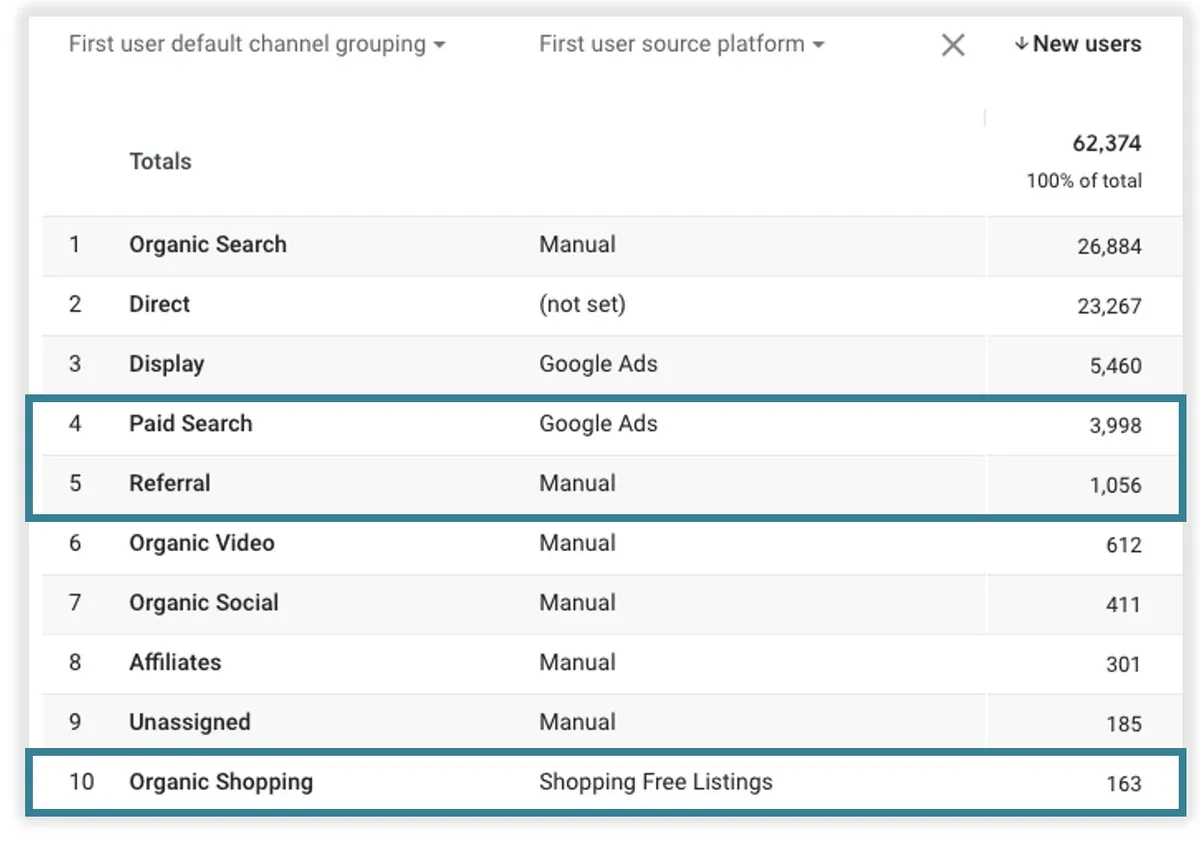
Keep those apart from the cross-channel dimensions called Source platform, Session source platform and First user source platform. Google describes those as “the platform where you manage buying activity,” with values including Google Ads, DV360, SA360, SFMC (Salesforce Marketing Cloud), Shopping Free Listings and Manual. Manual means “traffic that isn’t from Google media marketing activity.” Those cross-channel values are what the acquisition reports show. So a link tagged utm_source_platform=hubspot shows Manual in Session source platform, and hubspot only in Session manual source platform.
utm_creative_format and utm_marketing_tactic: Listed, Not Reported
Google defines utm_creative_format as the type of creative, for example display, native, video or search. It defines utm_marketing_tactic as the targeting criteria applied to a campaign, for example remarketing or prospecting.
Both carry the same note on Google’s URL builder page: they aren’t currently reported in Google Analytics properties.
The dimensions reference is a step ahead of that note for one of them. It already lists Manual creative format, Session manual creative format and First user manual creative format, each “populated by utm_creative_format URL parameter.” It lists no marketing tactic dimension at all. Until you see values in your own property, treat both as not reported.
Should you tag them anyway?
If your creative and targeting reviews already use a fixed vocabulary, yes. The parameters cost nothing, the values sit in Page location today, and your links are already tagged if Google starts reporting them.
If you would be inventing values under deadline pressure, no. An inconsistent value list is worse than an empty one, because the day it shows up in a report, someone will believe it.
Where Each One Shows Up in GA4
GA4 prefixes traffic-source dimensions by scope:
- First user dimensions keep the value that first acquired the user. Google surfaces them in the User acquisition report.
- Session dimensions take a new value each time a user starts a session. Google surfaces them in the Traffic acquisition report.
- Dimensions with no prefix are event scoped. They attribute credit for key events, in the Model comparison and Key event paths reports.
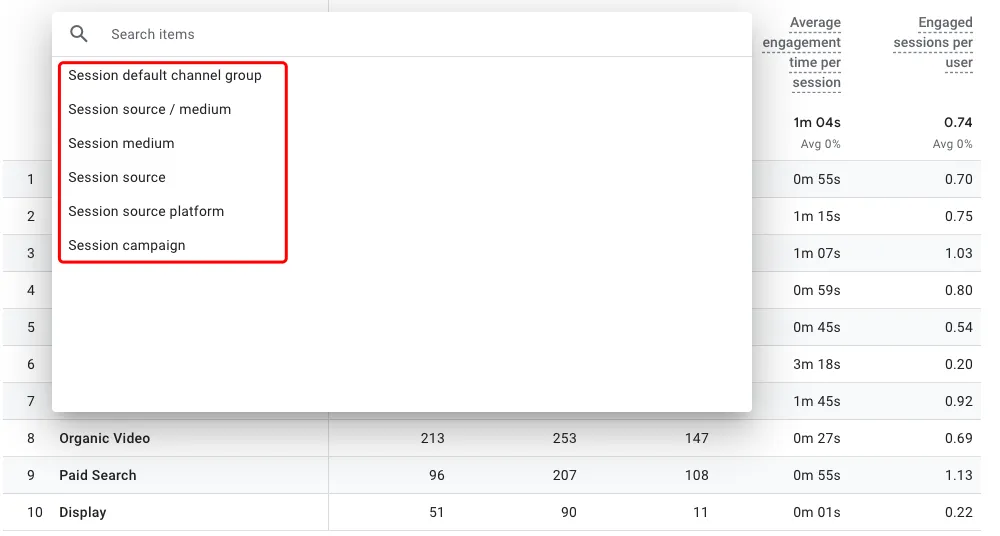
Now the part that trips people up. Google lists the Traffic acquisition report’s dimensions as Session campaign, Session default channel group, Session medium, Session source, Session source / medium and Session source platform. The User acquisition report offers the First user versions of the same set, plus two Google Ads dimensions.
No manual-prefixed dimension is in that list.
They have their own report. GA4’s pre-made Manual report shows Session manual campaign ID, Session manual source platform and the other Session manual dimensions. Open Acquisition overview and click View Manual campaigns on the Sessions by Session manual source card. If it isn’t there, Google says it may not be in your default set of reports, and an editor or administrator can add it to the navigation.
| You want | Where to look |
|---|---|
| Session source platform or First user source platform | Traffic acquisition or User acquisition report |
| Session manual campaign ID, Session manual source platform | The Manual report, or an exploration |
| Manual creative format dimensions | An exploration, once Google reports the parameter |
| A marketing tactic value | Nowhere yet. Capture it yourself |
Custom UTM Parameters GA4 Doesn’t Know
Teams add their own parameters all the time: an internal cid that matches a CRM campaign, a utm_audience, a utm_region. GA4 maps the listed parameters it reports to campaign dimensions. Anything else gets no campaign dimension.
The value isn’t lost. GA4’s Page location dimension records the complete URL of the page someone visited, query string included. You can filter on it. Group by it and you get one row per full URL, not one row per parameter value.
To report on a custom parameter properly:
- Read it. In Google Tag Manager, create a URL variable, set Component Type to Query, and set Query Key to the parameter name, for example
utm_marketing_tactic. - Send it. On your Google tag, add a parameter under Shared event settings (sent with every event from that tag) with the variable as its value. To send it only with one event, add it as an event parameter on that GA4 event tag instead.
- Register it. In GA4 Admin, open Custom definitions and create a custom dimension. Choose the event scope and enter the exact parameter name from step 2.
- Wait. Google says it can take 24 to 48 hours before you can report on a new custom dimension.
The value lives only in the landing page URL, so only events on that page carry it. Report on it against page views or key events that fire there.
The same recipe works for utm_marketing_tactic today.
Mind the limits. A standard property allows 50 event-scoped and 25 user-scoped custom dimensions, and Google warns that high-cardinality custom dimensions can push data into an (other) row. Capture a governed list of values, not a free-text field.
When to Standardize Them
Don’t add all four because they exist. Branch on what you actually do.
- If you import cost data from non-Google ad platforms, standardize
utm_idnow. Google calls it highly recommended for matching imported cost to the right campaign. - If one source reaches you through several tools, standardize
utm_source_platform, or you will be comparing tools from memory. - If your creative and targeting reviews already use a fixed vocabulary, add
utm_creative_formatandutm_marketing_tacticwith that exact vocabulary, and capture them with custom dimensions if you need them in GA4 now. - If none of that applies, skip them.
Five well-governed parameters beat nine sloppy ones.
Standardizing means a value list somebody owns, checked on every link. In Terminus, the marketing taxonomy governance platform, each of these parameters is a field in a governance model. utm_source_platform can be a static picklist. utm_creative_format can be a hierarchical picklist, a static list where the chosen medium narrows the formats on offer. utm_id can be a concatenated name built from other governed fields (include one that differs per campaign, or two campaigns will build the same ID), and validation checks each link as it is built. Your own parameters, like cid, are fields too. The Quick, Form and Grid builders, the CSV round trip and the API all apply the same rules, so the ID on a link comes from one rule instead of someone’s memory.
The Short Version
utm_id and utm_source_platform are reported now, and utm_id is the one Google recommends for cost data import.
utm_creative_format and utm_marketing_tactic are defined but not currently reported. Anything else lives in Page location until you capture it.
Pick only the parameters a report will use, give each one an owned value list, and check every link against it before launch.
FAQ
Does GA4 support utm_id?
Yes. Google lists utm_id as the campaign ID parameter. It populates Manual campaign ID, Session manual campaign ID and First user manual campaign ID, and it is one of two optional but highly recommended keys for campaign cost data import (campaign name is the other).
What is utm_source_platform?
The platform responsible for directing traffic to your property, such as a buying platform that sets budgets and targeting criteria. Google’s examples are Search Ads 360 and Display & Video 360. GA4 stores the value in the Manual source platform dimensions.
What is the difference between Source platform and Manual source platform?
Source platform and its Session and First user versions are cross-channel dimensions with values such as Google Ads, SA360 and Manual. Manual source platform and its scoped versions are populated by the utm_source_platform value on your links.
Is utm_creative_format reported in GA4?
Google’s URL builder page says it isn’t currently reported, even though the dimensions reference already lists Manual creative format dimensions. If you need the value now, capture it with a custom dimension.
Is utm_marketing_tactic reported in GA4?
No. Google says it isn’t currently reported, and the dimensions reference lists no marketing tactic dimension.
Can I create my own custom UTM parameters in GA4?
You can add any parameter to a URL, but GA4 won’t turn it into a campaign dimension. The value stays in Page location. To report on it, send it as an event parameter and register an event-scoped custom dimension.
Which fields does GA4 cost data import require?
Campaign source, campaign medium, date and at least one metric (clicks, cost or impressions), plus currency when you import cost. Campaign ID (utm_id) and campaign name (utm_campaign) are optional but highly recommended, and every value must exactly match what GA4 logged.
Where do I find Session manual campaign ID?
Not in the Traffic acquisition report, whose dimensions stop at Session campaign, channel group, medium, source, source / medium and source platform. Open GA4’s Manual report (Acquisition overview, then View Manual campaigns on the Sessions by Session manual source card), or add the dimension to an exploration. If the Manual report is missing, an editor can add it to the navigation.
Every account starts with a 21-day trial, no credit card required.